

<domain> for the control plane, <plane-domain> for a data plane) — replace them with
your own deployment’s actual domains.
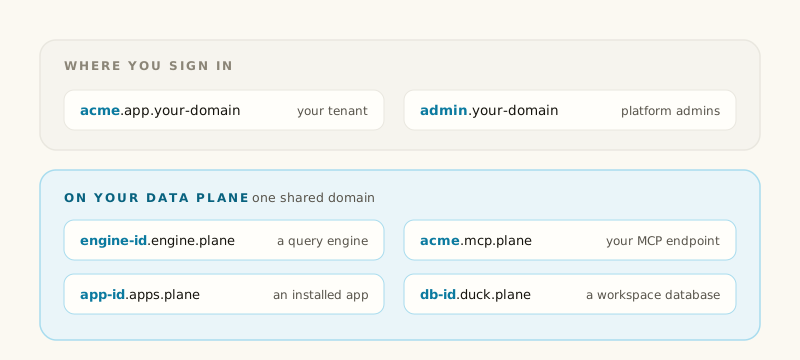
<slug> is your tenant’s short identifier; <engine-id>, <installation-id> and <db-id>
are the object’s own id.
If your tenant’s slug is mcp, its tenant-specific MCP address is
mcp.mcp.<plane-domain> and its registry address is mcp.registry.<plane-domain>.
The shared MCP address is exactly mcp.<plane-domain>.
When registering a new data plane, its slug cannot be engine, apps, mcp, registry, duck,
docs or app, and its base domain cannot start with one of those labels. app is reserved because
mcp.app.<domain> is the mcp tenant’s console address. Existing planes with such a domain keep
their tenant-specific addresses but have no shared MCP address. For example, a plane at
registry.parent.example cannot publish mcp.registry.parent.example: that address belongs to
the mcp tenant’s registry on the plane at parent.example.
apps.<domain> namespace in the table above.
Readable app addresses are available on managed AWS and GCP data planes when enabled for your
deployment. New installations receive a readable address after readiness checks complete.
Existing installations keep their address until you explicitly retry installation or select another
version. Copy the ready link shown for the app; an upgrade alone does not change its address.
Which addresses survive a rename?
Engine and database hostnames use their object IDs. Readable app addresses use app and tenant slugs reserved when the address is assigned. Changing a display name does not change an assigned app address. Long names or a name already reserved can receive a stable suffix; copy the address shown by the app rather than constructing one. Existing app links using an installation ID continue to reach the same installation after it receives a readable address. Deleting an app does not transfer its reserved address to another app. The tenant’s own hostname is the one exception, because it’s built from your slug rather than an id; changing your tenant’s slug is a separate, deliberate operation that does move it.Two networks, one set of names
admin.<domain>, app.<domain> and <slug>.app.<domain> are served by Dippr’s own control plane. Everything under
.engine., .mcp., .docs., .apps., .registry., .git. and .duck. is served by a data plane, where your
data and compute actually live, which may be Dippr’s shared infrastructure or, in a separated
deployment, running inside your own network. In a separated deployment, those data-plane hostnames are
reachable directly by your own users and tools over your own network — Dippr’s control plane never
sits in the path once a connection is authorized.
TLS
Each hostname family is covered by one wildcard certificate per data plane —*.engine.<plane-domain>,
*.mcp.<plane-domain>, *.apps.<plane-domain>, *.registry.<plane-domain> and
*.git.<plane-domain> and *.duck.<plane-domain> because a certificate can only ever match one variable label. That’s also
why an engine, app installation or database uses a single variable label rather than a dotted
<name>.<tenant>.engine.<domain>: two variable labels would need a certificate per object instead of
one per plane. Readable app addresses combine both slugs in one label, covered by
*.apps.<domain> on enabled data planes. The shared MCP address, mcp.<plane-domain>, is also explicitly covered;
the *.mcp.<plane-domain> wildcard does not cover it.
OAuth discovery
A client discovering how to connect fetches these, unauthenticated:https://<slug>.app.<domain>/.well-known/oauth-authorization-server— the authorization server metadata: where to send a user to sign in, where to exchange a code for a token, and which scopes this tenant’s server supports.https://app.<domain>/.well-known/oauth-authorization-server— the shared account authorization server metadata for shared MCP connections. Its endpoints are listed below.https://<slug>.mcp.<plane-domain>/.well-known/oauth-protected-resource— the MCP endpoint’s own protected-resource metadata, naming the tenant’s authorization server and the scopes an MCP client should ask for.https://mcp.<plane-domain>/.well-known/oauth-protected-resource— the shared MCP endpoint’s protected-resource metadata, naming the shared account authorization server.
https://app.<domain> as the authorization
server. If your deployment uses a custom account address, discovery names that address instead.
The shared MCP address accepts OAuth tokens only. Sign in for this exact address even if you already
have a token for a tenant-specific address. API keys cannot connect through the shared address.
Shared MCP discovery advertises the OAuth resource with a lowercase hostname, no trailing DNS dot,
and no default HTTPS port (
:443). A configured non-default port remains part of the resource.
See OAuth scopes for what each advertised scope means.
Related
OAuth scopes
Every scope Dippr issues, and who can hold it.
API overview
Calling Dippr’s API directly, from your tenant’s own host.