What you can do
Data sources
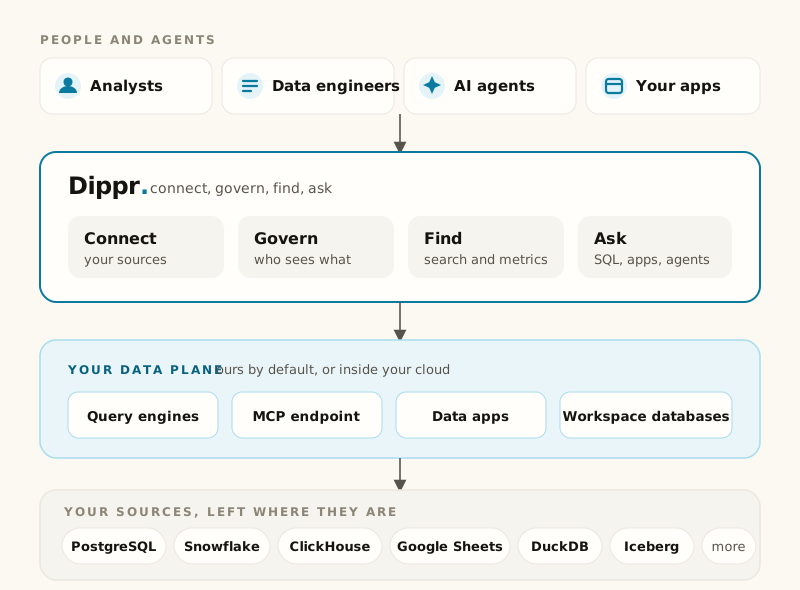
Connect Postgres, Snowflake, ClickHouse, Google Sheets, DuckDB and Iceberg REST catalogs, and
test each connection before you rely on it.
Data planes
The execution boundary where your compute and your data actually run: ours by default, or
registered inside your own cloud account.
Query engines
Managed Trino clusters sized to your plan, with catalogs derived automatically from your
integrations and scale-to-zero when nobody’s querying.
Explore and SQL
Browse every catalog your engines expose and run SQL against them from the same page, with
query history and per-table lineage.
Semantic layer
Certified metrics and a shared business vocabulary: concepts, relationships and the tables
that realize them, so “revenue” means the same thing to everyone who asks.
MCP and agents
A Model Context Protocol endpoint per data plane, so Claude or any MCP-capable agent can run
SQL, search your metadata, and read your metrics as a scoped, consented client.
Live Apps
Packaged applications that run inside your data plane and query your engines on your users’
behalf, installed from a manifest with explicit consent.
Workspace databases
A DuckDB database of your own, writable straight from your machine or with Trino SQL, that every
engine reads live as a catalog.
dip CLI
One binary for signing in, connecting your coding agent, and building and shipping data apps,
with no repository checkout and no package registry.
How it fits together