

dip itself — to your tenant, it requests
a set of scopes: named capabilities, not roles. A scope is a ceiling on what a kind of client
may ever do, never a grant of new access. Holding query_engines:execute_sql never lets a
connection run a statement your own roles wouldn’t already let you run yourself.
The consent screen
When you connect tohttps://mcp.<plane-domain>, sign in or sign up at the shared account
page that opens. The consent page selects where the connection will act:
The workspace address is the short name at the start of your tenant’s URL, such as
acme in
acme.app.<domain>. The proposed address comes from your email domain, or your email’s local part
for personal providers such as Gmail and Outlook. You can edit it before approving: the card shows
the resulting URL as you type, and an address it cannot use (anything other than lowercase letters,
numbers and hyphens, starting and ending with a letter or number) shows an error under the field
and keeps Approve disabled. If the address is taken, correct it and retry; retrying the same
approval does not create another tenant.
Creating a tenant usually takes under a minute. While it is being set up, the consent card shows
Setting up your workspace <slug>… and keeps the page open on its own: it sends the same
approval again until the tenant is ready, then returns you to your app. You don’t need to select
Approve again. If setup takes longer than five minutes, the card shows “Your workspace is being
created. Try again shortly.” and Approve works again; selecting it resumes the same tenant.
A consent page stays usable for 10 minutes after it opens. If it has expired, start the connection
again from your app.
If you join a tenant after opening a consent page that offers to create one, approval asks you to
restart the connection. Start again from the app that requested access, then select your tenant.
If a tenant for your email domain already exists, the page asks you to contact its administrator
for an invitation. You can explicitly choose to create a separate tenant with a numbered slug.
An email domain alone never grants membership, and opening the consent page creates nothing.
The connection acts in exactly the tenant you selected or created. To connect to another one,
start a new connection and choose that tenant.
Redeem authorization codes and refresh tokens at the token endpoint of the authorization server
that issued them. Grants issued at the shared account address use https://app.<domain>/oauth/token.
Grants issued at your tenant’s address use https://<slug>.app.<domain>/oauth/token, including
grants for the shared MCP address. Using a different authorization server’s token endpoint returns
invalid_grant.
Approving a connection shows a card naming the client and your tenant, where the approval goes,
and the list of what it’s asking for:
Client name wants to access your tenant.
Unverified app Dippr has not verified this app’s name.
Approving sends access to claude.ai.
It will act as you, with your permissions. Data access is still checked per query.
Any client can register itself and choose its own name, so the name is always marked Unverified
app: an app that calls itself “Claude” is not necessarily Claude. What the platform does enforce is
the address under it. The approval is only ever delivered to that host, so check it before you
approve: claude.ai or chatgpt.com for those assistants, or this computer (a 127.0.0.1
address) for dip and other local tools you just started yourself. If the address is one you don’t
recognise, select Cancel.
The address is shown so that a lookalike reads differently. It is always shown in full, so read it
to the end: claude.ai.evil.example is an evil.example address, not Claude’s. A port the address
names is always shown. An address written with characters from another alphabet, such as a Cyrillic
“а” in place of a Latin “a”, is shown in the xn--… form your browser uses, with a warning under it.
Under that, the screen leads with a few plain-language capabilities. A capability is a short
headline, such as “Read your data”, that groups the scopes a client asked for. The default
connection shows five:
A client that asks for more, such as
dip login, also shows headlines like “Connect and change data
sources”, “Create and reconfigure query engines”, “Publish data apps” and “Install data apps and
change their access”. A publish-only request does not include installation consent.
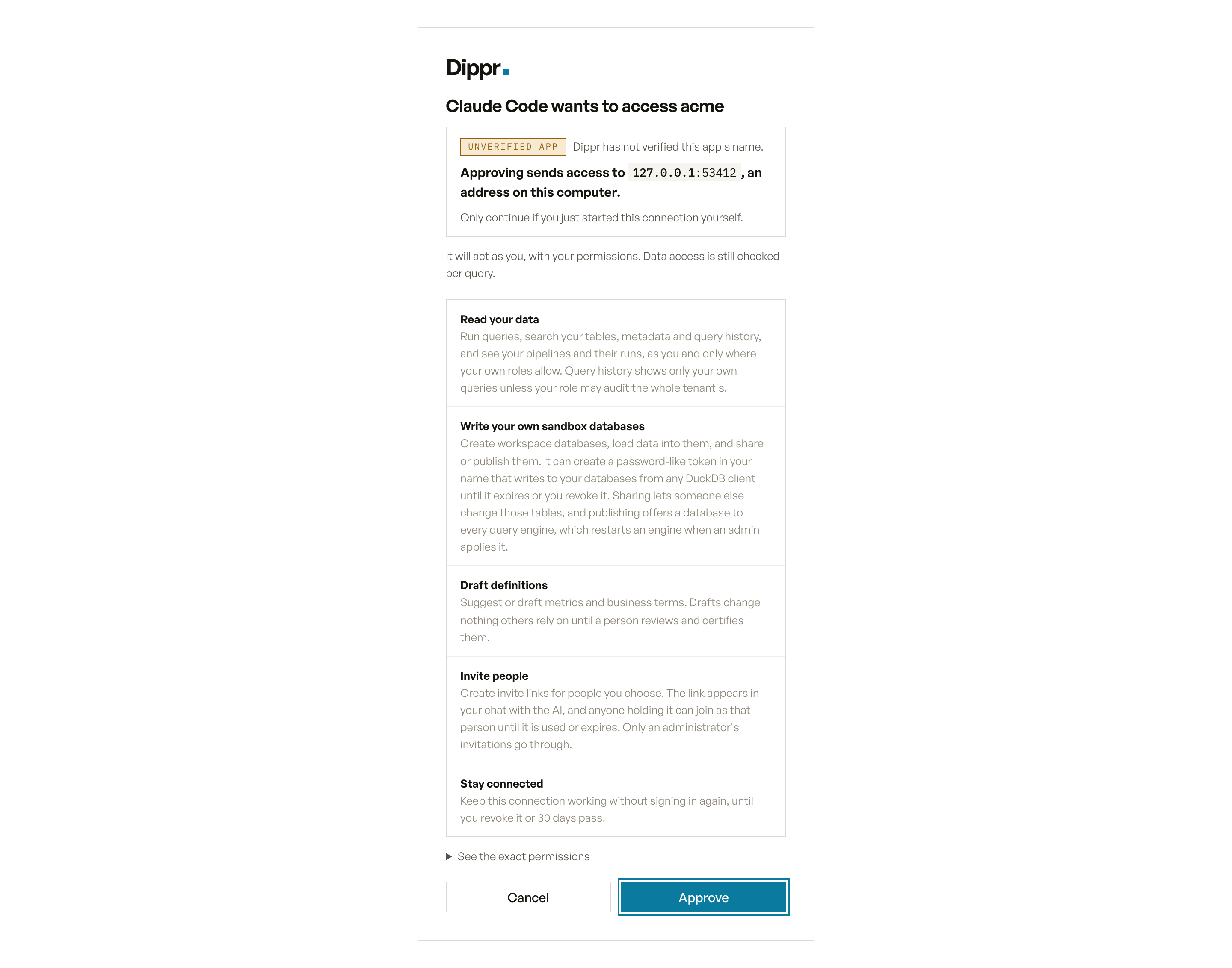
The consent screen for a new MCP connection: its capabilities, with the exact permissions behind a link.
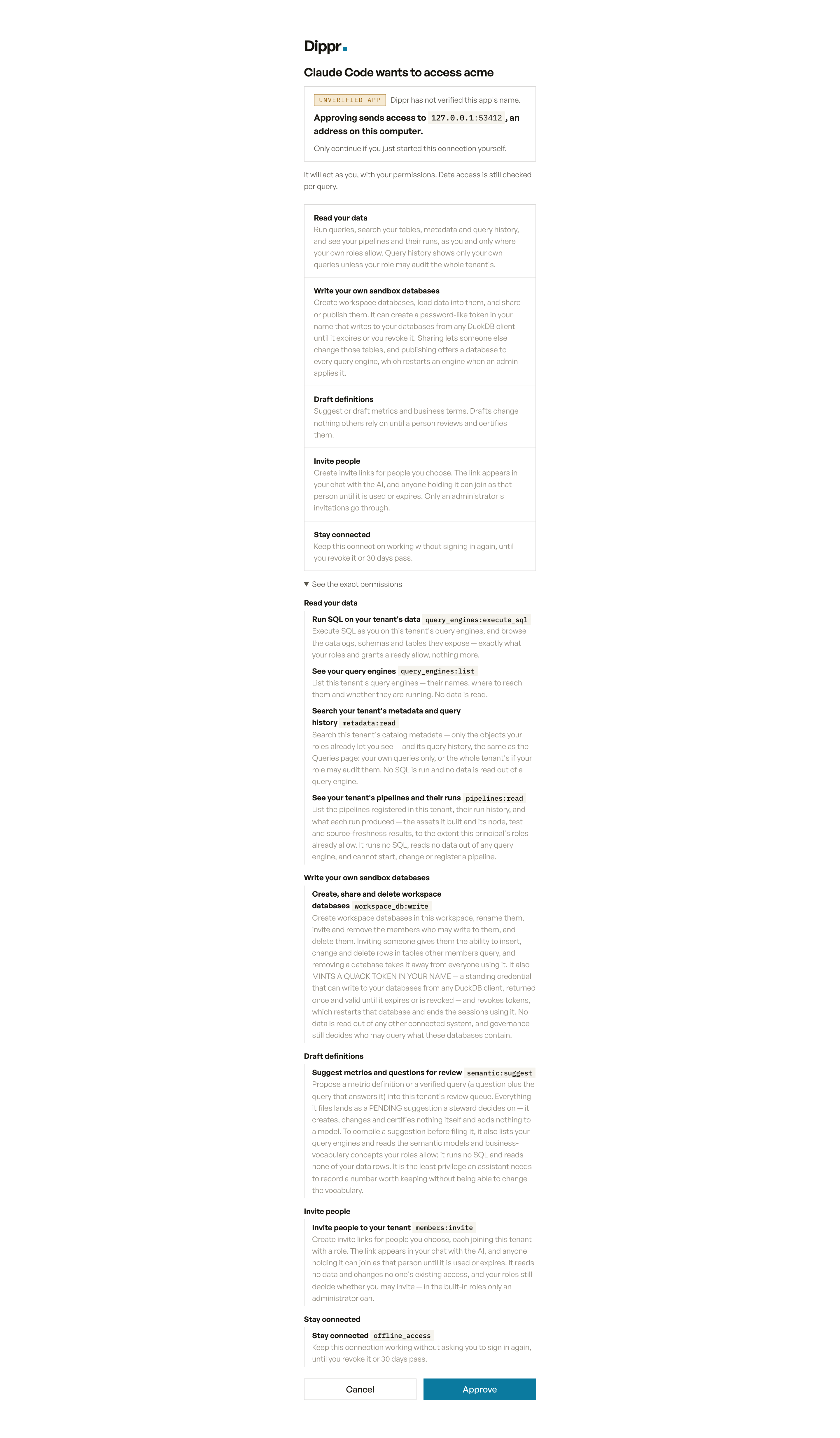
See the exact permissions, expanded: each scope's name and full description under its capability.
Only the scopes a client actually asked for appear on your screen — a client that requests nothing
beyond browsing SQL never shows you a row about publishing apps. A new MCP connection that names no
scopes of its own asks for the default consent: run SQL, see your engines, search metadata and query
history, suggest metrics, write your own workspace databases, see your pipelines and their runs,
invite people, publish your pages as read-only apps, and stay connected. Inviting is part of the
default so a tenant admin can invite from the chat; for everyone else the permission does nothing,
because only an administrator’s invitations go through. See
What a new connection asks for by default. Approve grants exactly the list
in front of you; Cancel grants nothing.
Each consent screen can be answered once. If you click Approve twice, or reload and resubmit
after answering, the second attempt says the request is no longer available and grants nothing more.
Start the connection again from the app that asked for it if you need a new one.
Effective access is three things intersected
Holding a scope is necessary, never sufficient. What a connection can actually do is- Scope narrows by capability. A connection without
query_engines:writecan’t create an engine, no matter what your roles say. - Your roles and grants narrow by what you personally may do. A connection holding
query_engines:writestill can’t create an engine for someone who holds no create grant on engines — see Roles and permissions matrix. - The endpoint narrows by which door the connection authorized against. A token minted for your tenant’s MCP endpoint can’t be used against an engine’s own endpoint, and vice versa — see Addresses and hostnames.
Scopes are fixed at the moment you approve
A connection’s scopes don’t change after you approve them, even if your tenant later turns on a capability the client would now like to use. If you connected an agent before a feature was enabled, or before your roles changed, ask it to authenticate again so the new authorization can request the wider set. The consent screen then names the permissions the connection did not have before. A connection can gain only permissions in the default set this way. See Reconnecting after a capability was added.Revoking a connection
Settings → Connected apps lists every connection you’ve approved and revokes any of them. The connection’s own access stops within about a minute; a query-engine, app or registry sign-in it already obtained can last up to 15 minutes (see that page). Removing the server from your agent (claude mcp remove, dip mcp uninstall, deleting the entry from Cursor’s config) only stops your
agent using it. Even without a revoke, the connection’s access ends on its own once its
offline_access grant runs out, at most 30 days after you approved it.
Revoking a service user’s alt_ key is different and does live in the console: go to Settings →
Service users, find the key, and revoke it. Every connection using that key is refused within a few
seconds on the data plane; the console checks on every request.
Management scopes: why dip login asks for more, and you never see it on this screen
dip login requests a wider set than any MCP connection ever does: the default consent every
connection gets, plus the scopes its own commands need:
dip login --scope "<names>" with exactly the scopes you want.
You approve these capabilities for your tenant’s management address. Registry, engine and MCP
connections authorize their own addresses; a token for one cannot substitute for another.
dip requests publication and installation by name. Another public OAuth client can request them
and ask for your consent too, but an ordinary MCP connection does not request them by default.
Installation also requires your current permission and ownership, plus a separate confirmation of the
selected app’s access and code trust. See Install an app.
Headless dip pipeline commands can use service-user API keys with pipelines:read for listing
pipelines and run results, pipelines:manage for operating them, or pipelines:publish for
publishing pipeline images. A hosted image push also needs apps:publish to sign in to the registry.
dip pipeline push and register also work on your own dip login: it asks you once, in the browser,
for pipelines:publish.
The reserved pipelines:report scope is for an external reporting flow that is not available yet.
A local dip pipeline dev run needs no API key: signed in with dip login, it connects to the
engine as you, with your own access (the query_engines:execute_sql capability above). With
$DIPPR_API_KEY set, it connects as that key’s service user instead, which is how CI runs it.
These control-plane capabilities do not appear when you approve an MCP connection. See
OAuth scopes for their limits.
A saved sign-in from before pipelines:read joined the default (or one narrowed with dip login --scope) lacks it. dip pipeline list, runs and events say so before calling the workspace, and
the fix is one plain action: sign in again with the command the message prints, dip login followed
by your workspace address. dip cannot tell such a sign-in whether the workspace has pipelines at
all, because that check needs the same permission, and the message says so. A workspace whose
deployment does not include pipelines answers pipelines are not available in this workspace instead,
and signing in again does not change that. A service-user API key without the capability gets its own
message naming pipelines:read as the one to grant.
Documents upload consent
A client registered to requestdocuments:write by name can ask you to approve Add documents to Documents.
This lets it upload files as you into folders you may add to. Files are parsed and indexed and remain
private unless you separately approve automatic sharing or manually share them in the console.
Existing approvals and refreshed credentials do not silently gain sharing authority.
A separate documents:share_uploads approval, Share new document uploads with folder readers, lets
new uploads follow the sharing preference on tenants using Documents access to manage folder
permissions. When that preference is on, eligible readers are selected at admission and checked again
before publication. When off, new uploads remain private. On the support-managed Documents setup,
new agent uploads stay private to you while you retain folder and classification access, even with
sharing approved. The upload returns a note explaining that automatic sharing is unavailable.
You can manually share the file in Documents using Share… from its row menu.
Existing files are unchanged. dip doc upload asks for both approvals, including renewed approval
for older logins. Older clients with only documents:write keep uploader-only uploads.
See agent upload sharing. Documents must be enabled
for your tenant. These permissions grant neither reads nor ACL changes and are separate from the
scopes a standard MCP connection requests. API keys cannot hold them.
Related
OAuth scopes reference
Every scope in one table, who can hold it, and how implication works.
Connect an AI agent
Where this consent screen shows up in each client’s setup flow.
Routine access
For routine investigations, register your client requestingagents:run and routines:read
explicitly. They appear on the consent screen when requested; they are not part of the default
MCP scope set. Reconnecting a client that does not request them will not add them.
agents:run starts manual investigations, proposes pending routines, pauses future runs, and dismisses or restores your own never-activated routine drafts. Restoring a draft still requires fresh console confirmation before it can run.
routines:read reads metadata and results within your current access. These are separate permissions.
Neither approves a write a routine or task proposes. That is agents:review. It is never part of the
default or discovered consent and never carried into an exchanged token, so a connection holds it only
if the client explicitly requested it and you approved that line on the consent screen. Otherwise,
approve in the console.
routines:write is reserved and does not authorize confirmation. Confirmation requires the owner’s recent console sign-in and task update permission. A data plane cannot acquire this scope through token exchange. Saving from chat without explicit start creates a pending proposal. Explicit personal starts can begin without console confirmation.
Confirm in a fresh console session. A scope alone never authorizes another person’s access.