

Shared plane, or your own
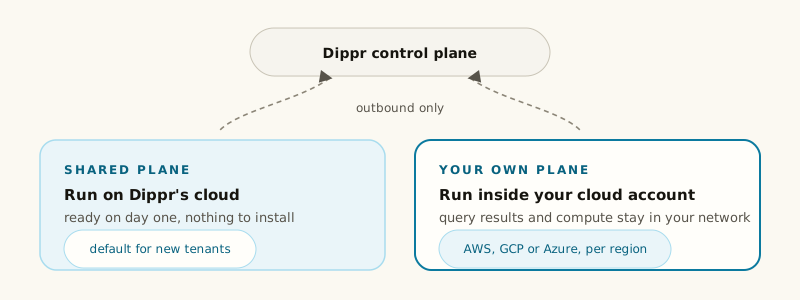
Every tenant starts with a shared plane — infrastructure Dippr operates, alongside other tenants’ work, in Dippr’s own cloud account. For most tenants this is all they ever need. A tenant created through self-serve sign-up sees this reflected on Settings → Data planes with a banner and a vendor chip — see Register or join a plane. If your data has to stay inside your own cloud account or network, you can register your own plane instead: a cluster you run, connected to Dippr’s control plane over an outbound-only link. Your plane dials out to Dippr; nothing in Dippr’s control plane dials in. (Your own users and AI clients still connect to the plane’s endpoints, see which AI clients can reach a private MCP endpoint.) Two things follow from that:- Dippr’s control plane never needs network access into your infrastructure.
- Your connectors, engines and apps run entirely inside your own account, under your own network policy.
This is sometimes called BYOC (bring your own cloud). Registering one is covered in
Register or join a plane.
Several planes in one tenant
A tenant can have more than one data plane at once: the shared plane plus a plane you operate yourself, or several of your own planes in different regions or clouds. Nothing forces you to consolidate. Each integration, query engine, app installation and workspace database belongs to exactly one plane. You choose the plane when you register or create the thing — an integration’s register form, an engine’s register form, and so on all offer a plane picker. Your tenant has one default plane (the first one you registered), which is what a plane-less create falls back to, and what a headless tool likedip app push targets when you haven’t named one explicitly.