

dip integration commands and the API. Registering an integration doesn’t move any data by itself — it makes the source available to query engines, which turn it into a catalog you can query and browse.
What you can connect
“Capabilities” says what Dippr does with the credentials: driver lets you test the connection (and, in later releases, move data); federation is what lets a query engine query it; MCP is recorded on the integration but not yet wired to a tool — the deployed MCP server ships no per-source tool providers in v1. Data-level read and write access is never decided here — it’s governed separately by roles and grants.
The Data sources page
The page opens on two tabs: Registered, the sources you already have, and Add integration, a catalog of every kind you can connect — one card per kind, with its logo, its name, and how many you already have. A tenant with nothing registered yet lands straight on the catalog. Next to the Registered count, Healthy counts the sources whose last connection test passed. Each row carries its own badge: Never tested, Test failed or Connected, from the last Test connection on that source. A platform-managed source, which has no connection to test, reads Managed. On a source’s own page, the data plane row says whether the plane is reachable; that is about the plane, not about this source. Clicking a card opens the register form already set to that kind — the dialog’s title names it directly (“Connect PostgreSQL”, “Connect Snowflake”, and so on) instead of asking you to pick a kind from a dropdown first. An AI link can open this form with the source kind selected in a focused view. If the link leaves the kind for you to choose, the task follows the first source you register. If that source is unverified, the task stays pending until you successfully test that same source; registering another source does not replace it. A link that selects a kind still requires that kind. The banner names the client and, after you connect the source, prompts you to return to your AI. The link grants no permissions: if you cannot connect sources, ask an admin. The source selection is used once: registering the source or leaving Add integration clears it from the link, so reloading the Registered tab does not reopen the form. The client banner remains. For sources with a generated key, authorize the key and successfully test the connection to finish the task. You can close the authorization panel and use Test connection on the Registered row later. Each connected row carries a small magnifying-glass button beside Test connection that opens the source straight in Explore — the fastest way from “I just connected this” to browsing what’s in it.Don’t have the keys yourself?
Under the catalog, a line reads: “Don’t have the keys to set this up? Invite the person who does.” If your role can invite tenant members, an Invite them button sends them a link to sign in and connect the source themselves — it shows up here as soon as they’re done. If your role can’t invite, the same spot tells you to ask an admin instead.Lifecycle
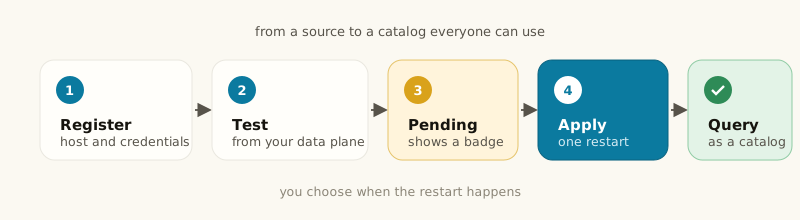
1
Register
Pick the kind’s card on the Add integration tab, fill in its connection
details, choose the data plane that should hold the credentials, and click
Connect. When the source can be probed, Connect tests the connection
first and won’t save if that test fails — so a saved integration is one
Dippr actually reached, not just one you typed. See Test connection and
secrets for how the test runs
and how secrets are handled.
2
Test connection
You can also dial the source explicitly with the Test connection button
— against a draft before saving, or against a saved integration from its row
or page — and confirm Dippr can reach it.
3
Used by engines as catalogs
Any integration with the federation capability becomes a catalog on every
query engine on the same data plane, once you apply.
4
Catalogs pending
Registering, editing or deleting a federation-capable integration doesn’t
change a running engine immediately — a check runs in the background and the
engine shows catalogs pending if applying would change what it serves.
5
Apply
Applying is a deliberate, admin-gated action, because it restarts the
engine’s query coordinator and interrupts anything running. Nothing applies
automatically.
Who can register
Testing a connection counts as an authoring action, not a read: it dials the external system with stored credentials, so a read-only role can see that a source is registered but can’t probe it.
Plan-gated: connectors to external systems
Registering, editing or testing a source needs your tenant’s plan to include external connectors. This isn’t a banner on the page: Register, Edit and Test connection stay visible and clickable, and you only learn about the gate when an action is refused with the message:this tenant does not include the “external_connectors” entitlementListing, opening, deleting an integration and rotating its stored key all keep working without this entitlement — only acquiring or changing a connection to an external system needs it. If you see this message, ask your account admin about your tenant’s plan; see Entitlements.
Platform-managed catalogs
A couple of catalogs aren’t registered from the dialog above — the platform creates and manages them for you, and they don’t appear as a kind in Register integration:- Workspace databases — when a workspace database first starts serving, Dippr creates a catalog that reads it live, and that its owner can also write with Trino SQL. Its entry on the Integrations page, and in
dip integration list, is visible only to the database’s owner and to admins. A member the database is shared with can open the database itself but does not see this entry; everyone sees every other source. - Sample datasets — clicking Use sample data on the Overview Get started card adds a platform-hosted sample (the avocado prices dataset) as a read-only catalog, so a new workspace can reach a first query with no source of its own. The object is hosted in your data plane’s own storage and attached read-only. You can remove it from the Integrations page like any other catalog. On a data plane Dippr runs, a workspace’s first query engine gets the sample added automatically before it starts.
Secrets, in brief
Every secret you enter (a password, a key, a token) is sealed to the data plane you chose before it’s stored — only that plane can open it. Reading an integration back always shows a secret as hidden, never as plaintext, and there’s no API or console action that retrieves one. See Test connection and secrets for the full picture, including editing and rotating credentials.Editing and deleting
Editing an integration replaces its configuration; leave a secret field blank to keep the value already stored. Moving an integration to a different data plane requires re-entering every secret, because a sealed value can’t be transferred between planes. Deleting an integration removes it and its stored credentials immediately. If it was in use as a catalog, every query engine that served it drops the catalog the next time it’s applied — queries against it fail from that point on. Deleting doesn’t touch any data at the source itself.dip integration commands
The dip CLI covers the same actions as the console:
--capability and --secret-stdin.