

viewer up can view the
list; creating, reconfiguring or deleting an engine needs the data_admin role. See the
roles and permissions matrix.
Registering an engine, waking one, and changing its configuration or catalogs can be gated by
plan. An unentitled tenant keeps seeing, parking and deleting whatever engines it already has. See
Entitlements.
An engine’s Configuration panel — its compute and cost settings (worker count, spot usage,
CPU/heap and query-memory limits) — is shown only to a role that can change it (
data_admin, i.e.
QueryEngine · update). A viewer sees the engine and its status but not these operator-level
tunables. A programmatic caller (an API key or OAuth token) additionally needs the
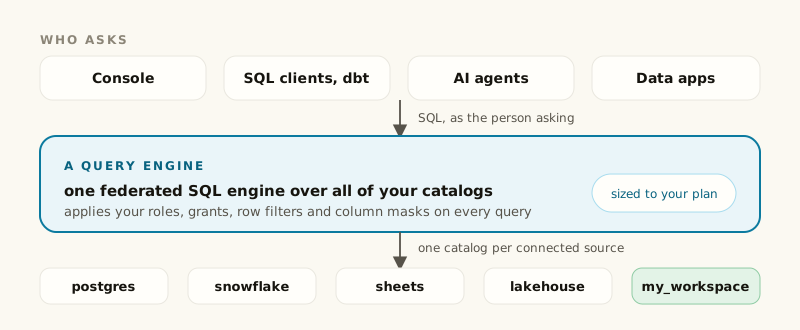
query_engines:read_config scope. This is enforced by the server, not just hidden in the console.Clients connect to an engine directly — query results never pass through Dippr’s control plane.
The console only manages the engine’s registration and lifecycle.
Kinds
An engine has a kind — today,trino — chosen the same way as an integration’s kind, from the
list of kinds the platform supports.
The list, column by column
Lifecycle at a glance
1
Create
You name it and pick a plane and a kind; size and idle suspend are optional, under Advanced. See
Create an engine.
2
First apply
The engine provisions and its first catalog set applies automatically — nothing is running yet for
an apply to interrupt.
3
Ongoing operation
Catalog changes (an integration added or removed) and configuration edits are detected and staged as
pending; applying them restarts the engine deliberately, never automatically. It suspends itself
when idle and wakes on the next query, or you can park it yourself.
4
Delete
Removes the engine from the registry and stops it in the background, which can take a few minutes; queries running on it fail. Clients can no longer be pointed at it from the console. SQL keeps running only if another ready engine on the same data plane has your databases applied.
An engine that a pipeline’s runs are pinned to cannot be deleted: the delete is refused and names
those pipelines. Re-pin each with
dip pipeline set-engine, then delete again. An engine that a data
app is installed on is refused the same way, naming the apps.The names appear only to a caller who may read pipelines (or app installations). A credential limited
to deleting engines, or a role without that read, is told how many pipelines or apps are in the way
and that their names are withheld; ask someone who can read them (the Live Apps page lists the
apps, dip pipeline list the pipelines). The delete is refused either way.Addressing is rename-proof
An engine’s endpoint ishttps://<engine-id>.engine.<plane-domain> — built from the engine’s own id,
never its name. Renaming an engine never changes the address anything already connects to it with:
every JDBC string, notebook, dbt profile and bookmark you’ve written keeps working. See
Addresses and hostnames.
Related
Create an engine
Field by field through the register form.
Connect to an engine
Every way a client reaches your engine.