

catalog.schema.table). An engine’s catalog set isn’t configured directly; it’s derived
automatically from your federation-capable integrations on the engine’s own data plane. Register
an integration with the federation capability and it becomes a catalog on every engine on that
plane; remove it, and it stops being one.
catalogMode as static for production engines. This describes the last
successfully applied configuration; a pending change or failed Apply does not change it.
The engine API’s lastSyncedAt is empty until a catalog set has been applied. After that, it is a
UTC RFC3339 timestamp that preserves fractional seconds. Parse it as a timestamp and keep those
fractions when comparing Apply results: two applies can finish within the same second.
How catalogs are named
A new integration’s catalog name comes from its display name: lowercase, with runs of other characters collapsed to one underscore and ac_ prefix if it would start with a digit.
“My Lakehouse” becomes my_lakehouse. If two new integrations reduce to the same name, both get a
short suffix from their integration IDs, such as my_lakehouse_1a2b3c4d. Trino reserves the
catalog name system for its own use, so an integration whose name reduces to system always gets the
suffix, for example system_1a2b3c4d.
A workspace database uses the SQL name shown next to In SQL on its card. That name is pinned
when the database’s catalog is created, the first time the database is serving, so the engine does not
derive a different one from the integration display name. If another catalog took the name before
then, the database receives a suffixed SQL name. See The catalog name.
Once an engine mounts a catalog, it records and keeps that name across later applies. Renaming its
data source or adding a similar one does not move it. Registering a data source whose derived name
collides with a name already mounted on an engine on the same data plane is refused; choose a
different display name. The same check applies when an edit enables federation or moves the data
source to another data plane.
An engine applied before catalog names were recorded may need one Apply before you can create a
shared database or add a new workspace database catalog on its data plane. This keeps the names it may already
serve from being assigned to a different catalog.
A deleted data source’s catalog remains on the engine until the next Apply. A new data source with
the same name receives that name at that Apply.
Why Apply is usually manual
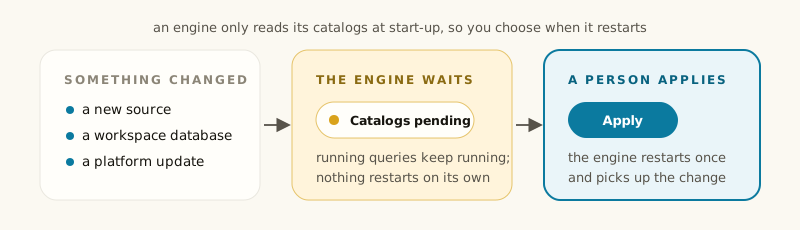
Trino reads its catalogs from files at startup, so making a catalog change take effect means restarting the coordinator — which fails every query running on it at that moment. So for most changes Dippr does not restart the engine on its own. Instead:- A background check compares your integrations against what the engine actually has mounted, on a schedule, without touching the running cluster.
- When they differ, the engine’s Configuration column shows pending, naming what changed.
- Nothing restarts until you click Apply.
dip engine apply --json reports "joined": true for an
apply that was queued this way.
After deleting a database, wait for Synced and confirm its catalog is gone. An accepted or
queued Apply is still in progress; the earlier apply can finish with the database’s old catalog
before the queued apply removes it.
Two cases are not queued. An Apply that also has to re-provision the engine (a changed engine setting
or a platform update) is not queued behind another provision: it reports that nothing was
dispatched, and you apply again once the running one finishes. And while Dippr is being upgraded, a
catalog Apply that meets an apply started by the previous version is also not queued; it reports
the same way.
There are three exceptions, all cases where the restart cannot interrupt anyone:
- When an engine first provisions, its very first catalog set applies automatically, since nothing is running yet. If that first apply fails, Dippr tries it again every few minutes until it succeeds.
- When the engine is stopped. See Stopped engines apply on their own.
- When you add your own data (your workspace database first starts serving, or you add the sample dataset) and the restart would affect nobody else. See the next section.
Stopped engines apply on their own
A stopped engine applies its pending changes by itself, because nothing is running on it. This covers every kind of pending change: catalogs, a saved setting, and a platform update. It also covers a parked engine.- Within about 10 minutes of a change becoming pending, Dippr applies it to the stopped engine.
- The engine stays Suspended, Parked — wakes on first query or Parked. Applying does not start it.
- A Suspended or Parked — wakes on first query engine wakes on its next query with the new setup, including every workspace database on its plane. A Parked engine starts with it once someone clicks Wake.
- If the engine turns out to be running when Dippr checks, nothing is applied and the engine stays pending.
When Dippr applies your change for you
When your workspace database first starts serving, or you add the sample dataset, Dippr restarts the engine to add it if all three of these are true. For a workspace database this happens once in its life; writing to it never needs an apply.- Nothing else is waiting. The only pending change on the engine is workspace database or sample catalogs. On a running engine, a changed data source, a changed engine setting or a platform update still needs someone to click Apply; a stopped engine applies them on its own. If the engine has a DuckDB file connected as a data source, apply the change yourself: the file can change while its address stays the same, so Dippr cannot prove that only your workspace database or sample changed.
- You are the engine’s only recent user. Nobody else ran a query on the engine in the last 30 minutes. Dippr’s own background work (such as metadata crawls) doesn’t count, and neither do queries you ran through a data app.
- Nothing is running on it. The engine is asked for its running queries at the moment of the restart. If one is running, the restart doesn’t happen. A stopped engine counts as idle. An engine that is still starting up (for example a brand-new engine that Dippr just woke to read its tables) is waited for, up to two minutes, until it is up and has nothing running; if it isn’t by then, the restart doesn’t happen. After that wait, Dippr reads your data sources again and applies the set as it is then, so a database deleted during the wait is never added back. If the data plane cannot perform this check, the automatic restart is refused; ask an admin to update it.
dip say “Restarting your engine to
add this, about a minute.” Otherwise the engine stays pending and the reason is shown in plain words, for example
“someone else used this engine in the last 30 minutes”.
For a pending workspace database on a busy engine, members receive an immediate step: ask a tenant admin to open
the console’s Query engines list using the guidance link and click Apply on that engine’s row. Applying restarts the
engine and interrupts running queries; the link grants no permissions. While others keep using the
engine, it will not apply the catalog on its own. Dippr does not retry the once-per-database
attempt when the 30-minute window passes. With idle suspension enabled, the engine must have no
queries for its idle timeout before it stops; Dippr then normally adds pending catalogs within
about 10 minutes, and the next query wakes it. An engine set to Never suspends needs an admin
apply. If another apply is already running, check its result before applying this change.
Before any of that, Dippr checks whether there is anything to apply. If the engine already serves the
same version of the sample, its fixed workspace database catalog names and write settings are unchanged, and
nothing else is waiting, there is nothing to restart for. Nothing is refused, nothing restarts,
and the MCP tools report the sample as ready after checking its catalog and tables, even while
someone else is using the engine. A newer sample version or a changed fixed workspace database catalog name
or write setting goes through the three checks above.
For a workspace database without a fixed catalog name, a rename takes effect on the next deliberate
Apply.
After an upgrade, an already-served workspace database can still show an apply-needed status.
Have someone who manages the engine click Apply once, then check the status again.
Waiting for a background check does not clear this status.
On a brand-new engine that has not finished its first start, your change rides that first start
instead. If the first start already failed, Dippr starts it again for your change. If a start fails,
the reason begins “the engine apply failed, so this change is not on the engine yet:” followed by
the error, rather than “Restarting your engine”. Dippr keeps retrying the first start on its own,
and the reason clears once it succeeds. For a new workspace database, dip db status
and the MCP workspace_db_list tool show that reason until the engine mounts the database; on a data
plane with several engines, dip db status gives it for each engine that has not mounted it, and
workspace_db_list gives it per engine in engine_catalogs. Someone who manages the engine can then click
Apply, or you can run dip engine apply <name> --yes (or pass --yes to
dip integration sample) to restart it anyway.
“Recent user” is read from the query history, which reaches Dippr a few seconds after each query
finishes. A query another person finished in the last few seconds may not be counted yet. Queries that
are still running are always caught by the third check, so the most this gap can cost is a restart
between two of someone else’s queries, never a query that fails partway.
Why can’t my engine read workspace databases?
An engine needs a platform update once before it can mount a workspace database’s catalog. Until it has it, applying its catalogs fails with a message namingplugin.workspacedb and telling you to
re-provision. Apply the engine’s pending Platform update, then apply its catalogs again. If the
message says the data plane runs the stock Trino image, engines on that plane can’t read workspace
databases at all; ask the person who runs your data plane.
Why can’t my engine read Jira?
An engine needs a platform update once before it can mount a Jira Cloud catalog. Until it has it, applying its catalogs fails with a message namingplugin.restapi.jira and telling you to
re-provision. Apply the engine’s pending Platform update, then apply its catalogs again. If the
message says the data plane runs the stock Trino image, engines on that plane can’t read Jira at all; ask
the person who runs your data plane.
The three things “pending” can mean
The Configuration badge names every reason that’s actually true — an engine can be pending for more than one at once:
Hover the badge for the detail; the engine’s own page explains a platform-update reason further,
since — unlike the other two — there’s nothing on that page to compare it against.
Applying
Click Apply on the engine’s row in the Query engines list. The confirmation names exactly what will change — for a catalog change, the count going from N to M — and restates that the engine restarts and in-flight queries fail. Confirm only when the interruption is acceptable. Clicking Apply resolves every pending reason at once — a staged size change and stale catalogs both get fixed by a single Apply, whichever reasons are true.An engine with no catalogs
If your plane has no federation-capable integrations, a new engine mounts nothing —SHOW CATALOGS
returns only the built-in system catalog. Registering an integration with the federation
capability on that plane is what adds one.
From the CLI
Apply pending changes
--yes. See dip CLI commands for the full reference, including
dip engine config for staging a change first.
Related
Sizes and plans
What a size change stages as a pending config, before you apply it.
Power and scale to zero
Why Apply restarts the engine but suspend and wake don’t.