

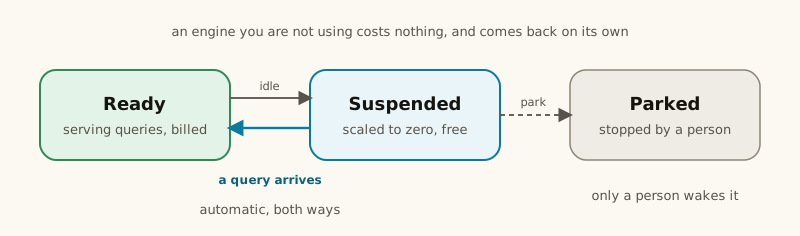
Power states
The Power column and an engine’s own page show one of these, live:
A brand-new engine reads Parked — wakes on first query, not Starting: Dippr doesn’t spend a
cluster on an engine nobody has queried yet. It’s the same self-correcting “wakes on the next query”
promise as Suspended, worded so a first-time user knows nothing is wrong and no button needs pressing.
Idle suspend
Set when you create or edit an engine — Idle suspend offers Platform default, a set of preset durations, or Never suspends.0 means never suspend; it’s offered as its own labeled choice
rather than a number you’d have to know the meaning of.
The engine suspends only when both are true: it’s been idle at least that long, and it has no
queries currently running. A long analytical query that generates little traffic doesn’t get cut off
just because the clock ran out — Dippr checks the engine’s own query count before suspending, and
treats an engine it can’t confirm as busy rather than risk a query.
While an engine is suspended or parked, Dippr applies its pending changes (catalogs, settings, a
platform update) without starting it. A suspended engine (or a new one that reads Parked — wakes on
first query) then wakes up to date on its next query; an engine a person parked does when someone
clicks Wake. See
Stopped engines apply on their own.
Waking on demand
The next query to a suspended engine wakes it automatically. Your client doesn’t get an error while this happens — it gets a response that looks like the query is still queued, and keeps polling normally while the cluster starts, then continues onto the real result.A cold first query genuinely takes tens of seconds — this is the feature working, not a hang. If
you see an error instead (connection refused, a server error, a TLS failure), that’s a different
problem — a slow wake and a broken engine look nothing alike.
run_sql and query_metrics start the
engine and answer within seconds with status: "waking", so the agent can tell you the engine is
starting and call again. See When the engine is waking.
Park
Park, on the engine’s row or its own page, takes the engine down immediately — unlike idle suspend, it doesn’t wait for anything to go idle, and any query running at that moment fails. A parked engine stays down until someone explicitly clicks Wake: neither the automatic idle check nor an incoming query starts it again. Use it when you want an engine off now and want it to stay off, for example ahead of a maintenance window. Parking always works, even if your tenant’s plan doesn’t include managed query engines — but waking a parked engine back up manually does need that entitlement. If your tenant loses it while an engine is parked, that engine stays parked until the entitlement is restored; see Entitlements.Keeping an engine warm
Set its idle timeout to Never suspends — it then runs (and bills) continuously. Reasonable for an engine backing a dashboard or an always-on integration; wasteful for one only queried a few times a day.Searching a parked catalog
A parked or suspended engine can’t answer a live query, but metadata already indexed from it — schema, column names, past query history — stays searchable in Explore. Search doesn’t dial the engine.Related
Catalogs and Apply
Why applying a catalog change restarts the engine the same way Park does.
Health and metrics
Where to see an engine’s current power state on its own page.