

503 with
shared MCP authorization server is not configured. Use the tenant-specific address in that case.
The tenant-specific address, https://<slug>.mcp.<plane-domain>, also supports OAuth sign-in and is
required for API keys.
dip mcp list shows both addresses;
--json adds mcp_shared_endpoint beside the existing mcp_endpoint. dip plane list --json
reports the same addresses per data plane. See Install dip and sign in
for how dip registers the tenant-specific endpoints.
Why one server per data plane
A data plane’s query results go straight from it to your agent, never through Dippr’s control plane, so there’s no single global endpoint that reaches everything. If your tenant runs data in more than one data plane, connect your agent to each one whose data it needs — every connection carries its own name (dippr-<tenant>-<plane>), so they
sit side by side in your agent rather than overwriting one another. A data plane with no query
engine is still listed, with engines: [] in dip mcp list --json. Connect your agent and start
with workspace_status to see the onboarding steps for your tenant. On a plane with no engine
that is connecting a source; sample data is offered once the plane has an engine an admin has not
parked.
What a connected agent can do
Once connected and signed in, an agent’stools/list call returns whatever your data plane’s plan
and configuration actually publish:
- Browse and query — use
browsewithlevel=catalogs,schemas,tablesorcolumns, then run read-only SQL against your engines. - Search — search catalogs, tables, columns, certified metrics, verified queries and your business vocabulary by meaning or keyword, and search the history of queries your tenant has already run.
- Trace lineage — see what feeds a table and what depends on it, and the downstream blast radius of changing one.
- Read certified metrics — list and read your semantic layer’s metric definitions, and compute a metric with the certified SQL your data team already agreed on, rather than reinventing an aggregate.
- Read your business vocabulary — the concepts your tenant has named (Customer, Order, Churn) and how they connect, and from a concept, the models and tables that realize it.
- Read and write a workspace database — your own scratch database in the tenant, for a spreadsheet, a working table or the output of an analysis.
- Add sample data — add the sample dataset to your tenant and get a first query to run, before you connect any data of your own. It needs a query engine on the data plane.
- Work with source repositories: list and create plane-local repositories, inspect refs, create a
branch, get a clone address, and open a platform ref proposal. These tools appear only when your
tenant has the
plane_gitentitlement.
workspace_status. Every connection can call it, and it answers in
one call what the agent would otherwise piece together from several tools: your engines and whether
their catalogs applied, whether metadata search is indexed, how many certified metrics exist, and
what this connection is allowed to do, with console links for anything it can’t do itself. It never
wakes an engine. See workspace_status.
When your tenant has no catalogs mounted on this data plane, the first signed-in workspace_status
call returns an onboarding block with the available setup paths: try sample data with
add_sample_data when this data plane has an engine an admin has not parked, or connect a source through the console
link. Connecting a source remains available when this data plane has no engine. See
First steps with workspace_status.
When a tool refuses a call, the result is an ordinary error result, not a broken connection. It
carries a code from a fixed list (for example missing_scope, missing_role or unavailable), a
message_for_user sentence and a next_action. An agent can act on the code without parsing the
text: reconnect and approve a scope, ask an admin, or retry. See
When a call is refused.
If an engine has scaled to zero, run_sql and query_metrics return status: "waking" within
seconds, with no rows. The query has not run yet. Your agent can tell you the engine is starting,
wait retry_after_seconds, and call again with the same arguments. The result has no status
field once the engine is ready. See When the engine is waking.
Pages opened by your AI
A focused view is a console page for one task named in an AI link, such as connecting a source, reviewing a metric, or opening a data app. It hides the sidebar and breadcrumbs while you work. Supported client names are Claude Desktop, Claude.ai, Claude Code, Codex, and Cursor. MCP links include a client name when your connection makes it available. When the connection has no client information, your AI can pass its client id as the optionalrequested_by input to
workspace_status or suggest_metric. Supported ids are claude-desktop, claude-ai,
claude-code, codex, and cursor; other values are ignored. This is self-reported, display-only
attribution, just like the connection’s client information. Without a recognized name, links open
the usual console layout without a client banner; a source link can still select the connection form.
On Data sources, the banner says, for example:
Opened from a link that names Claude Desktop. Your credentials are sealed to your data plane’s key and never enter the chat.On semantic pages, it says:
Opened from a link that names Claude Desktop. Review happens in the console. Nothing is sent to the chat.On data apps, it says only:
Opened from a link that names Claude Desktop.The name comes from the link. It does not verify who sent it, sign you in, or give you additional permissions. Use your usual console sign-in and enter source credentials in the console. For a source your role can connect, the link can open the connection form with its kind selected. Otherwise the banner says, “Your role cannot connect sources; ask an admin.” After you verify the linked source’s connection, save a new semantic model, or accept or dismiss a review suggestion, the banner says, “Done. Go back to Claude Desktop and tell it you’re finished.” The client name matches the link. For a source with a generated key, first authorize the key and successfully test the connection. If you close the authorization panel early, Test connection on that source’s Connected row can finish the task. Editing that source also finishes the task when its connection test passes. Registering another source leaves the original task open. If your role can register sources but cannot update them, an unverified registration leaves the task open with: “Registered. Someone with update access must verify the connection.” Ask someone with update access to verify the registered source. Switch back to your AI and tell it you have finished; the page does not send a chat message for you. For Claude.ai the banner shows a Back to Claude.ai link; for apps without a web address, such as Claude Code, Claude Desktop, Codex, and Cursor, it says, for example, “Switch back to Cursor to continue.” Close this tab asks your browser to close the page. If the browser keeps it open, close it yourself. Choose Exit focused view to restore the usual console navigation on the same page and remove the task’s verification hint. Data apps keep this exit button and do not show a completion message.
Every call runs as you
There’s no shared service credential behind this endpoint. Every tool call executes under your own sign-in, or under the roles of the service user whose key you’re using — never under a broader identity than that. Rows and objects you aren’t permitted to see are filtered out or refused, the same as if you’d run the query yourself in the SQL workbench. AnAccess Denied from a tool is your
tenant’s access rules working as intended, not a bug to route around, and two people can
legitimately get different rows back from the identical prompt.
On a shared data plane, you can search and read your own query history and submit metric or
verified-query suggestions. Sharing the plane does not give other members access to your history:
only members with tenant-audit permission can read another member’s queries. See
Query history and Metric suggestions
for the required scopes and permissions.
What never leaves your data plane
The rows a query returns, and everything computed from them, stay inside the data plane that ran the query — an agent’s tool call goes straight to your data plane and the result comes straight back, never through a separate hop that could hold or replay it. What the server holds is only your own sign-in or API key, never a warehouse password or a catalog secret of its own.Who can connect, and how
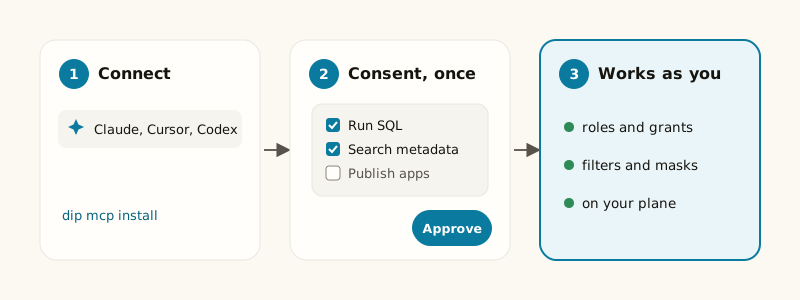
Two ways to authenticate, matched to who’s driving:- You, over OAuth. Your coding agent opens a browser, you sign in the way you already do for the console, and you approve what the agent is asking for on a consent screen. See Connecting your coding agent and Scopes and consent.
- A service user, with an
alt_API key. For a headless or scheduled agent with no browser to open. Use the tenant-specific address; the shared address refuses API keys. Mint a key at Settings → Service users and put it in the client’s bearer token configuration. See Connecting your coding agent.
401 invalid_token when your token’s tenant is not served by that
data plane. Check the endpoint for your tenant before reconnecting. If tenant verification is
temporarily unavailable, it returns 503; retry later.
What your plan gates here
Two different things about this endpoint can be gated by your tenant’s plan, and they behave differently:-
Search, the semantic layer and documents gate individual tools. If your plan doesn’t include the search
feature, the search and query-history tools simply aren’t in
tools/list. If it doesn’t include the semantic layer, the certified-metrics and business-vocabulary tools aren’t either. If it doesn’t include documents (unstructured_data),search_documentsandget_documentaren’t listed, and they are also left out whenever Dippr can’t confirm that entitlement, so an outage never exposes them. Either way, the rest of the server works normally — an agent never sees the missing tools offered, and never gets a confusing refusal for trying them. -
The MCP server itself can be off for your tenant. If your plan doesn’t include it, every
request to this endpoint is refused, not just a subset of tools — there’s no partial
tools/listto fall back to. The one place this shows up in the console is the “AI agents” hint on the Query engines page: with the server on, it shows the usualdip mcp installinstructions; with it off, it reads:The MCP server is not enabled for this workspace, so Claude Code, Codex and Cursor cannot reach it. This endpoint still works for SQL clients. Enabling it is a plan change rather than a setting anyone here can flip — contact your Altimate account team.
That endpoint the hint mentions (“still works for SQL clients”) is a query engine’s own JDBC/Trino connection, not this MCP server — the MCP server being off doesn’t affect it.
Related
Connect an AI agent
Step-by-step setup for Claude Code, Codex, Cursor, claude.ai and headless clients.
MCP tools
Every tool, its arguments, and what it needs to run.
Scopes and consent
What the consent screen is asking you to approve.
Agent skills
What
dip teaches your agent about using this surface well.list_routines and get_routine return that name, and the Automations list uses it as the name. Suggested drafts can also carry a one-line reason. Use dismiss_routine to retain your own never-activated draft in personal history, list_routines with state: "dismissed" to review it, and restore_routine to return it to pending confirmation. Dismissed drafts never run and are private to their owner. See Routine tools.