

viewer or a role that inherits it can preview their own app locally
with dip app dev. This grants no publishing permission or extra data access: preview queries apply
your data grants, row filters and column masks within the app’s declared capabilities.
Agent tasks → Create lets an analyst launch a consented installation. Agent tasks → Update
lets them send a follow-up or submit a review decision. A role grant does not expose another
launcher’s task conversation: the launcher or a data admin must pass the task’s separate read check.
Git repositories → Read lets a role list, clone, and fetch repositories. Create and
Update let a data engineer create repositories and push ordinary refs. A data admin can manage
protected refs. Repository access always follows these tenant roles; there is no separate repository
member list.
Marketplace installs → Create lets a role install a Marketplace listing
as drafts in the semantic layer, and Marketplace installs → Delete lets it remove an install
record; data_engineer holds both, and viewer holds Read, which is browsing listings and seeing
what is installed.
Picking a role
The role list on the left shows every role, built-in and custom. Selecting one shows its permissions on the right, starting on the Permissions tab.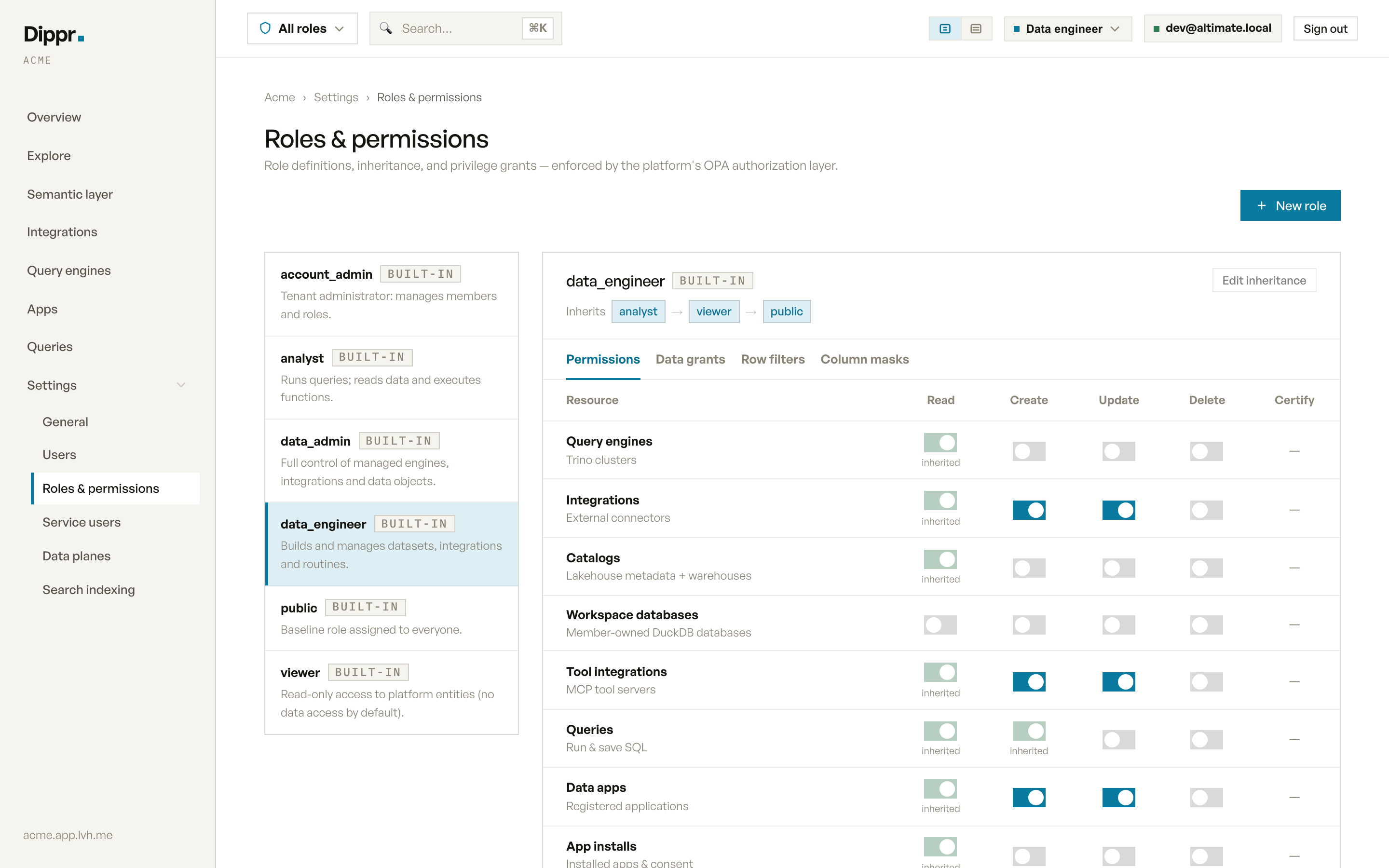
Settings › Roles & permissions: the built-in roles, and the permissions matrix for data_engineer with its inheritance chain.
account_admin shows as Full access instead of a matrix: it bypasses every permission check, so
there’s nothing to toggle. The one exception is members’ workspace databases:
an admin reads, writes or even lists one only through a grant that names that database’s catalog (see
below).
The permissions matrix
Each row is a kind of object (query engines, integrations, semantic models, members, and so on) and each column a privilege (read, create, update, delete, certify, audit, or preview where it applies). A toggle you can switch means the role can hold that grant directly. A green, locked toggle means it’s inherited from a parent role and can only be changed by editing that parent. A dash means the privilege doesn’t apply to that kind of object at all: for example, nothing can “certify” a query engine. Toggling a cell writes or removes a grant immediately, and it takes effect everywhere within moments. For roles without admin access, a deny from any role you hold, including an inherited role, wins over an allow. Selecting a narrower role only narrows your allows; it keeps denies from every role you hold. Your reported access and the capabilities you can grant an API key follow the same rule. Catalogs → Read lets you browse and search discovery metadata, including opening an object’s details, through both tenant management and data plane access.viewer holds it, and every staff
role inherits it: analyst, data_engineer, data_admin and account_admin. A custom role without
Catalog read cannot browse or search discovery metadata; it still sees Explore and its SQL editor
when it holds Query engines → Read.
Per-object permissions still limit which results you can see.
Member directory → Read lets a role list the tenant’s members (their emails and roles), which the
member pickers need. viewer holds it. A custom role built without viewer, for example one that only
opens a single app for someone outside your company, can’t see who else is in the tenant. Members → Read
also allows the list, so a role that manages people keeps it.
Members → Read also shows every member’s AI tools on Connected apps,
and Members → Delete lets the role revoke them. Every member can see and revoke their own without
either grant.
Data apps → Create lets a publisher reserve a new app repository and upload to repositories they
own. Updating another publisher’s repository requires permission to update all apps. Ownership and
current permissions are checked before accepting each upload request; an explicit App update deny
also blocks an owner. See App repository ownership.
For a custom role, the Data apps → Preview own apps cell offers Default, Allow and
Deny. Default removes that role’s own override and follows its inherited permissions. Allow
grants local preview. For roles without admin access, Deny blocks it even when a parent grants it,
and a deny on any parent wins over your own allow. The status below the control shows the resulting
permission. This permission grants no publishing, installation or table access. Built-in preview
grants remain read-only.
A custom role that inherits data_admin or account_admin shows Allowed (admin) for preview,
even if it already has a Deny saved. Admin access takes precedence over preview denies, so the
Deny option is disabled for these roles. Remove the admin inheritance before using Deny to
restrict preview.
Local preview also requires Query engines → Read so dip app dev can find an engine. If a role
allows preview without that permission, the cell shows Preview also needs Query engines: read.
Grant engine read separately or inherit viewer, which includes both permissions.
Editing a role’s grants (toggling a cell, or its inheritance) requires Role · create and
Role · delete together, not one or the other. Built-in role permissions are read-only,
except for the Own personal database defaults on
viewer and the own-app settings described below.Turn off personal databases for viewers
Every member withviewer has their own personal workspace database by default. The
Own personal database row on the built-in viewer role is an editable built-in default. To turn it off, select viewer on Settings → Roles & permissions and switch off
Read, Create or Update on that row. Switch a cell back on to restore it.
- Switching off Create stops members from getting a new personal database. Switching off Update stops them loading data into it. Switching off Read hides it.
- The change applies to every role that inherits
viewer. Roles with the Workspace databases privileges, fromanalystup, keep full access to their own databases either way. - It stays switched off across upgrades.
- Connection tokens a member already created stop working within about two minutes of switching off Update. The platform regularly checks every token against its holder’s current role, revokes the ones the role no longer covers, and asks for a restart of the database to end open connections. That restart is not confirmed, so a connection already open may stay attached. The same happens when you take a role away from a member or remove them from the workspace.
Turn off own-app publishing or management
Publish own apps allows a member to publish static versions of apps they own and delete their app records. Manage own apps allows installing a static version of their app, changing consent or version, waking, parking and uninstalling it. Publishing an app that runs its own server, such as Streamlit, needs a Data engineer’s broad publishing permission. Both are on by default forviewer, so
analyst inherits them. Neither grants access to someone else’s app or additional table data.
Select viewer, analyst or data_engineer, then choose Deny in Data apps → Publish own apps
or App installs → Manage own apps. Choose Allow to restore that role’s setting. Custom roles
offer Default, as do analyst and data_engineer: it removes their override and follows their
parents. The status beneath the control shows Allowed by parent, Allowed, Denied or
Not granted.
- A deny wins over narrow allows from every effective role, including inherited roles. Denying on
vieweralso affectsanalyst; allowing onanalystcannot override a deny fromviewer. Acting as another role keeps these denies: selectingviewercannot bypass ananalystdeny. - Changes apply to subsequent actions with already-issued credentials and stay in place across upgrades.
- Off disables all narrow management, including cleanup: Publish own apps controls deleting the app record, and Manage own apps controls parking and uninstalling. An app administrator retains cleanup.
- Broad app grants remain independent. A Data engineer’s broad publishing permission remains effective
even if own-app publishing is denied.
data_admin,account_adminand platform administrators keep their admin access; these controls do not switch that off. Allowed (admin) identifies that bypass. - Preview own apps remains separate. Turning off publication or installation does not disable preview.
Inheritance
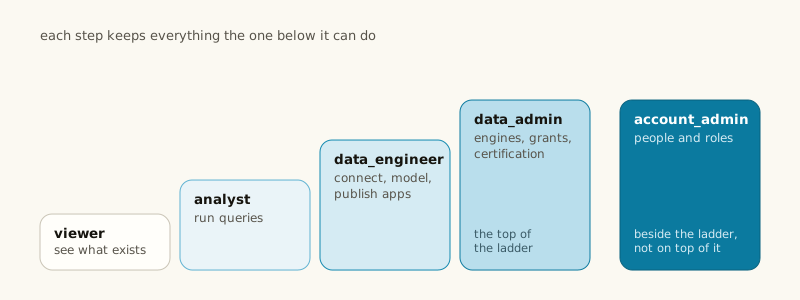
Every role’s card shows its inheritance chain: for example a custom role built onanalyst shows
Inherits analyst → viewer → public. Click Edit inheritance to add or remove parents for a custom
role. If you hold account_admin, you can re-parent any role, including a built-in one. Anyone with a
narrower, delegated ability to manage roles can only point a custom role at, or away from, a role
that’s within their own permissions, and can never re-parent a built-in role (viewer, analyst, and
the rest) at all, even one whose grants they fully hold.
Creating a custom role
Click New role, name it, describe what it’s for, and pick which roles it inherits from. A custom role starts with only what it inherits; add grants from the matrix afterward. A few names are reserved for the built-in admin roles and can’t be used for a custom role:account_admin,
data_admin, and platform_admin. Naming a custom role after one of these is rejected, so a custom role can
never be mistaken for a built-in admin role. Names starting with wsdb_owner_ or wsdb_share_ are
reserved too: those roles are created only when someone creates or shares a
workspace database, and Settings → Users labels them by that database.
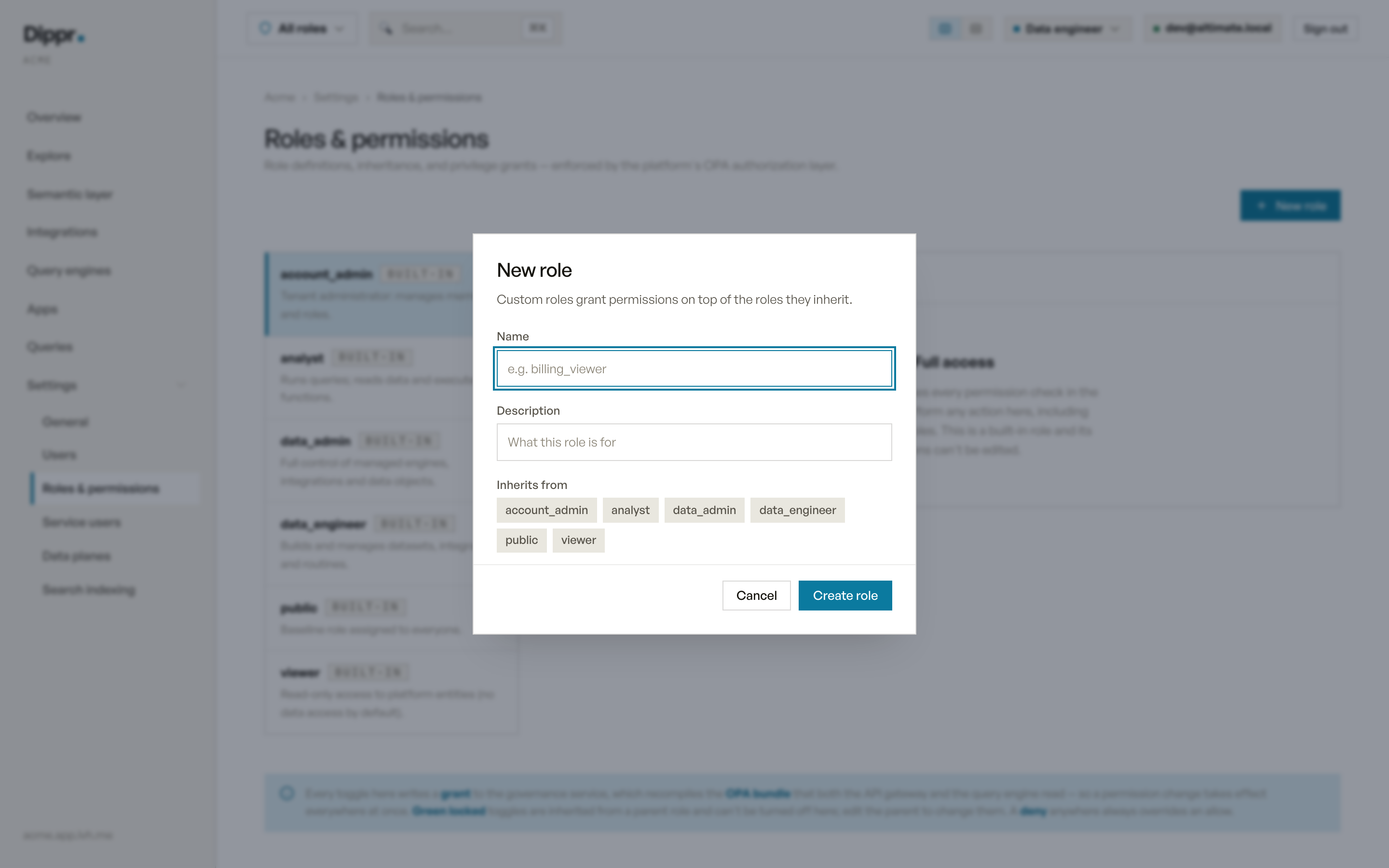
The New role dialog.
Data grants, row filters and column masks
Three more tabs cover privileges your query engine enforces directly, as opposed to the console actions on the Permissions tab:- Data grants: SELECT, INSERT, CREATE and similar Trino privileges on a catalog, schema, table,
function, procedure, or storage location. A broader grant implies the narrower ones inside it (a
catalog grant covers every schema and table in it). Each grant is allow or deny, and a deny
always wins over an allow at any level. A SELECT grant also lets the member find what it covers:
the MCP browse tools and the catalog’s
information_schemalist the tables they can query and those tables’ columns, masked columns included, and nothing else. A schema grant is schema-wide:SELECTonsales.publicreads every table in it, andINSERT,UPDATEorDELETEthere writes to every table in it, so you don’t have to grant table by table or open up the whole catalog. - Workspace databases are the exception to broad grants. A member’s workspace database is used in
Trino only through a grant that names its catalog, its schemas or its tables: the owner’s own
automatic grant, a share, or a grant an admin gives on that catalog by name. A grant that covers
every catalog, such as
analyst’s read access to all tables ordata_engineer’s write access to all catalogs, doesn’t reach it, and neither does being an admin. Someone without such a grant can’t query the database and doesn’t see it inSHOW CATALOGS,SHOW TABLESorinformation_schema.DELETEorUPDATEthere also lets the role run the destructive table procedures below on those tables.DROPon a schema lets the role drop or rename the schema, drop or rename every table in it, and drop every view and materialized view in it. It doesn’t cover renaming a view. - Row filters (row-level security): a boolean expression the engine ANDs into every scan of a
table, for example
region = 'EU'onsales.public.orders, so a query against that table only ever sees matching rows. - Column masks: an expression the engine substitutes for a column’s value,
for example
'***'forsales.public.customers.email, so a query sees the mask instead of the real value.
account_admin and
data_admin are exempt from the row filters and column masks on their roles, including on workspace
databases they own or are granted, so an admin’s query sees every row and the real values. An app’s
own filters and masks still apply when an admin acts through it.
A filter or mask binds only through the role that carries it; it is not a property of the table. A member
who reads a table through two roles, one filtered and one not, is filtered (the unfiltered role adds
nothing). Remove the filtered role and they read every row. The console asks for confirmation before such
a removal (see Assigning and removing roles).
Over the API, PreviewUnassignRole returns the same list in access_widening and removes nothing;
UnassignRole returns it too.
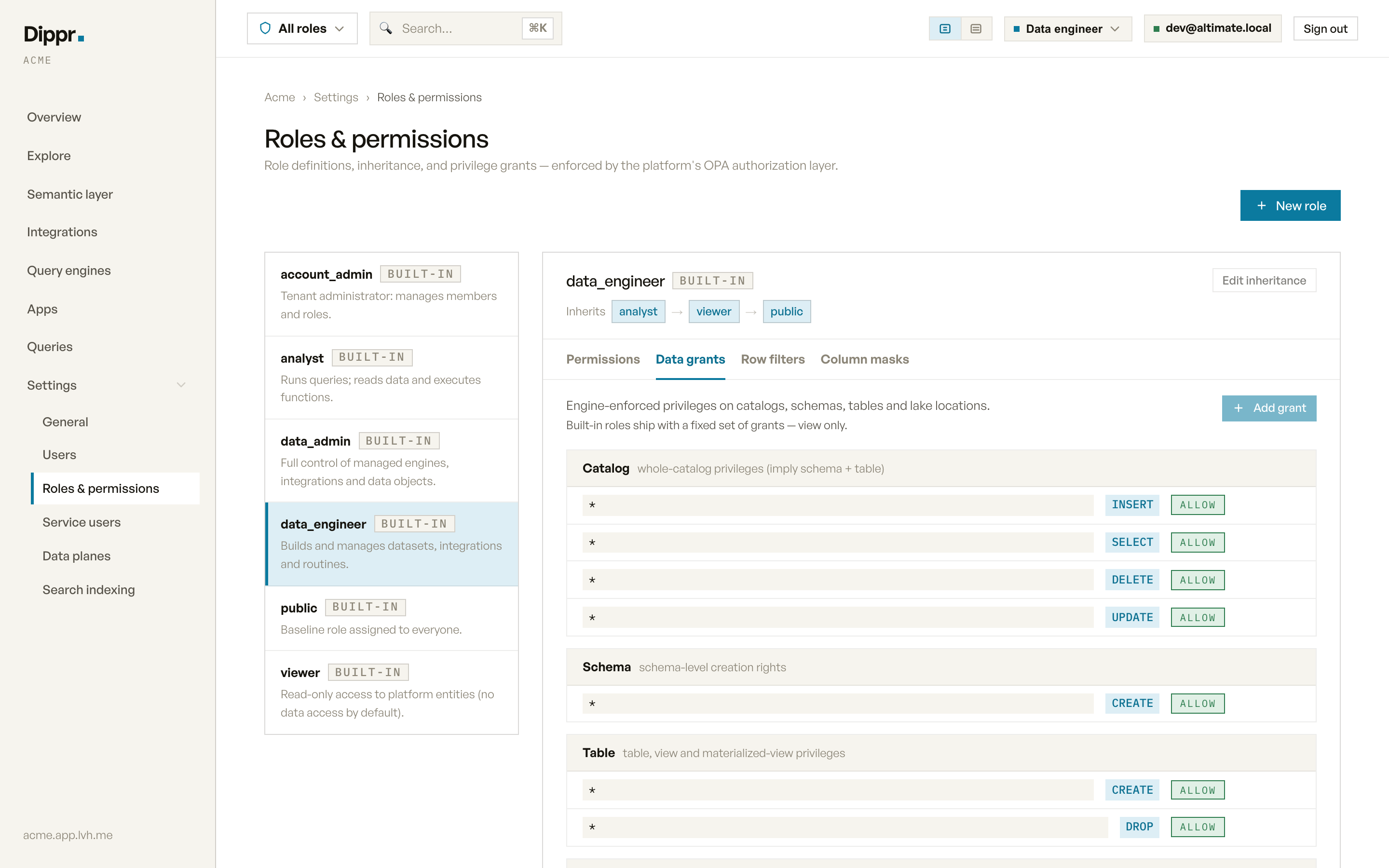
The Data grants tab of a role.
dip governance grant. To give a built-in role’s members more access, create a custom role that
inherits it, add the grant there, and assign the custom role to those members on Settings → Users.
A grant on the custom role doesn’t reach anyone who holds only the built-in role. If a built-in role
holds a data grant it doesn’t ship with, an admin (account_admin or data_admin) can remove it with
dip governance revoke; the grants a built-in role ships with can’t be revoked. Row filters and column masks don’t
have that restriction; you can add or remove them on a built-in role too, as long as you hold
Role · create and Role · delete. All three tabs feed the same permissions the Permissions
matrix does: a change here is saved immediately, and your query engine picks it up a few seconds
later, the next time it refreshes its copy of your rules. A query that is already running, or that
starts in those few seconds, can still be answered under the rules as they were before the change.
A row filter or column mask on a catalog that is a workspace database does one
more thing before it is reported as saved: the people invited to write to that database are removed
and their open connections end, because a direct connection reads the rows around the rule. This
usually takes a few seconds. If Dippr can’t confirm it within about 30 seconds, you see an error that
says the rule is saved but invited writers may still read the database directly; saving it again
waits for those connections to end. See
when a row filter or column mask is added.
To script data grants, or keep them in a repository, use dip governance:
dip governance grant --role finance_readers --on Table:lake.sales.orders --privilege SELECT makes the
same change as the Data grants tab, and running it again reports unchanged.
dip governance row-filter set and dip governance mask set do the same for the Row filters and
Column masks tabs, and warn when the role is account_admin, data_admin or inherits one,
because admins are exempt and such a rule restricts no one. dip governance effective <email> shows
what one member can reach through every role they hold, including the row filters and column masks of
inherited roles.
A role’s Row filters and Column masks tabs list the rules set on that role, then, under
Inherited from other roles, the rules of every role it inherits, each naming the role it comes
from. Inherited rules bind the role’s members just like its own; edit them on the role they come from.
Dangerous connector routines are denied by default
Federated catalogs expose a whole surface of connector routines — table functions, procedures andALTER TABLE … EXECUTE table procedures — that a plain Function · EXECUTE or Procedure · EXECUTE
grant would otherwise authorize without binding to the underlying table’s data grants, row filters,
column masks or list of permitted storage locations. Dippr governs three tiers of these directly in the engine
policy. The first two are gated by new privileges that no built-in role holds (blocked by default,
admin-grantable); the third is re-mapped to the ordinary table privilege the procedure performs, so it
is bounded by the same DELETE/UPDATE grants — and denies — that already govern the table.
- Raw-SQL passthrough —
<catalog>.system.query(...), the procedure formssystem.execute(...)/system.procedure(...), and the connector aliasraw_query(...)send raw SQL straight to the source and return rows with no table identity, so row filters, column masks and table denies cannot apply. An admin may run passthrough; to let a specific non-admin role run it, an admin grants that role the dedicatedFunction · PASSTHROUGHprivilege (denied by default, and never available through a data app). An ordinaryFunction · EXECUTEgrant — whichanalystand any role inheriting it hold, so ordinary functions keep working — does not authorize passthrough. - Storage-mounting procedures — Iceberg
register_table,add_files,add_files_from_tableandmigrateattach a table or ingest files from a caller-named object-storage location, outside the list of permitted locations that constrainsCREATE TABLE … WITH (location = …). An admin may run them; to let a non-admin role mount, an admin grants the dedicatedProcedure · MOUNTprivilege (denied by default, never available through a data app). - Destructive table procedures —
ALTER TABLE t EXECUTE expire_snapshots | remove_orphan_files | rollback_to_snapshot | vacuumpermanently drop data, andoptimize | set_current_snapshot | drop_extended_statsrewrite it. Dippr authorizes each against the table privilege it performs — the destructive ones needTable · DELETEon the target, the rewriting onesTable · UPDATE— so a member with onlySELECTon a table cannot run them, and a table-level deny blocks them.data_engineerholds those table privileges via its catalog grants, so ordinary Iceberg maintenance on its own tables keeps working. To let another role maintain one table without write access to the whole catalog, add a Table grant ofDELETEorUPDATEon that table’s ref in Data grants.
run_sql tool goes one step further and refuses every one of these for everyone, admins
included: because the wrapped SQL or CALL is opaque, the tool cannot prove it is read-only or governed,
so it declines it and asks you to query the governed tables directly.
A SECURITY INVOKER view’s denial can still name its underlying table
A view createdWITH (security = 'INVOKER') runs its query as the CALLER, not its owner: reading it
evaluates the caller’s OWN access to whatever the view resolves to. A member granted the view but not
the table behind it is denied — but the denial can still name the underlying table, not the view:
SECURITY INVOKER view today — only a member’s own SQL can — and a caller who hits this
already holds a grant on the view itself. What is exposed is the underlying table’s NAME, not its data
or any row in it.
Documents folder grants
A DocumentFolder grant names one Documents folder in the tenant. Use a custom role: built-in roles cannot take these grants. The folder reference must be 1 to 63 lowercase letters, digits, underscores or hyphens, starting with a letter or digit; an empty reference and* are refused.
The accepted privilege names are read, add and manage. Each grant records an explicit ALLOW or DENY effect. Grants and revokes appear in the access log.
Documents folder access
For governance-managed Documents access, see Documents folder access to give a role View, Add files or Manage access to a folder. Automations read data you can read, including your workspace databases and workspace databases shared with you. What they read can be sent to the configured model provider to investigate your instruction. Each person’s run uses that person’s current access, within installation consent and budgets. Scheduled SQL changes require the routine owner’s approval in the console; per-person routines are read-only.Routine permissions
Saving and starting personal work usesAgentTask · create and AgentTask · update, both included in the analyst role. An explicit personal start through MCP or dip needs a verified person, without a console confirmation. Editing, scheduling, deleting, confirming and discarding routines uses AgentTask · update. Changing Read only or May propose changes also uses that grant and is owner-only; widening is recorded in the work log.
Legacy draft confirmation and per-person subscription still require a recent console sign-in. Every scheduled write requires its owner’s approval in the console; a dip or MCP bearer cannot approve it, even with review scope. MANUAL task review is unchanged. Installing an agent still requires installation permissions. Authorized administrators retain operational controls but cannot supply another owner’s consent or read private work-log entries. See routine controls for start, stop and approval details. Shared run status is visible to authorized readers; item views for people other than the run owner are coming.
Recurring work controls
Changing a saved work cap or requesting access to its durable guidance requiresAgentTask update permission and a verified person with agents:run consent. The service also checks that the person owns the work. An administrator who can inspect task metadata cannot use that access to read or edit another owner’s guidance or change their cap. Guidance remains private data-plane content; editing it does not approve a proposed write.
The built-in routine runner can read a workspace database when the person whose access the run uses can read it, within installation consent. Ordinary role wildcards and app consent still require a named workspace-database grant. Sharing a workspace database grants read access; it does not grant writes. After an unshare or revoke, subsequent queries refuse access once the policy update arrives. Already retained results and model input are not recalled.