

The map
Everything in Dippr hangs off one tenant. People and machines belong to it and hold roles; sources are connected to it as integrations; and its compute runs in one or more data planes. Short, plain-language definitions of terms like these are also in the glossary.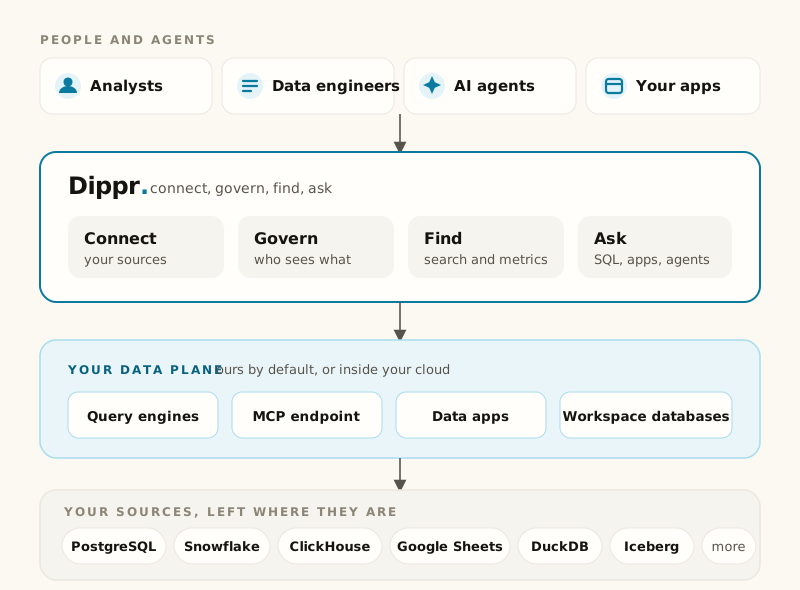
Who you are
Tenant is the account your work happens in: everyone you work with, every source you’ve connected, and every engine, app and database you’ve registered belongs to exactly one. You reach yours at its own subdomain, likeacme.app.us.dippr.ai. See
Users and members.
Member and roles: A member is a person who belongs to your tenant. What they can see and
do is decided by the roles they hold: built-in roles like viewer, analyst, data_engineer,
data_admin and account_admin each inherit everything the role below it can do. See
Roles and permissions and the full
roles matrix.
Service user and API key: A service user is a machine identity for a script, a scheduled job,
or an agent that isn’t a person signing in. It authenticates with a long-lived API key (alt_…)
instead of a browser session, and it’s assigned roles the same way a member is. See
Service users and API keys.
Where your data lives
Dippr is split into a control plane, which holds who you are and what you may do, and a data plane, which holds your compute and your data. The control plane never reaches into a data plane; the plane connects outbound to it.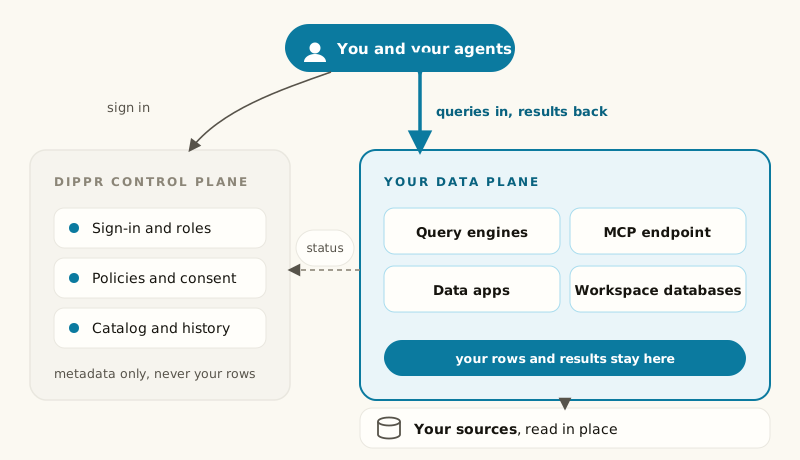
driver lets a query engine read it directly, federation lets
other catalogs be queried alongside it, and mcp exposes it to MCP tools. See
Integrations.
Query engine and catalog: A query engine is a managed Trino cluster that runs SQL against your
connected sources. A catalog is the named collection of schemas and tables one integration exposes
to an engine, usually one catalog per connected integration. See Query engines.
Catalogs pending and apply: Connecting a new source, a workspace database’s first time serving,
or a platform update changes what an engine’s catalogs would be, but an engine only reads catalogs at
startup. So a change sits as “pending” until someone clicks Apply, which restarts the engine and
interrupts whatever it’s running at that moment. See Catalogs and apply.
Engine power states: An engine is Starting while it provisions, Ready once it’s serving
queries, Suspended after it scales to zero from being idle (the next query wakes it
automatically), or Parked after someone deliberately stops it (only a person can wake it back
up). Draining and Stopping are the brief transitions in between. See
Power and scale-to-zero.
Working with data
Explore: The console’s page for browsing catalogs and running SQL against your query engines, in one surface: you read a table in order to query it, and you query it to understand what you read. See Catalog browser and SQL workbench. Query history and lineage: Query history is the record of every query your tenant’s engines have run, visible to everyone who can read it. Lineage is the graph of what produced a given table or column and what depends on it, reachable from that table’s own page. See Query history and Lineage. Metadata search and the crawl: A crawl is a scan of your engines’ catalogs that indexes tables, columns and queries so you can search across all of them from one box. It’s a paid capability, and it costs engine time to build. See Search and Search indexing.Meaning, not just tables
Tables are what your sources expose. The semantic layer and the ontology add layers of meaning on top, each governed and certified separately.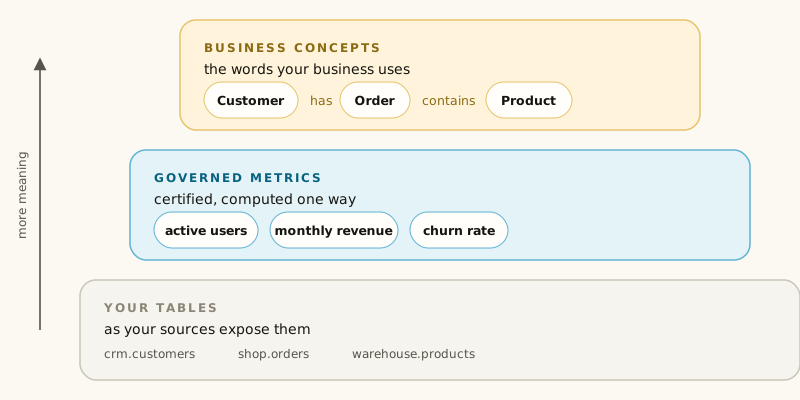
Connecting agents
An agent connects to your tenant’s MCP endpoint, asks for scopes, and you consent once. Every tool call after that runs as you, so what it can see is what your roles already allow.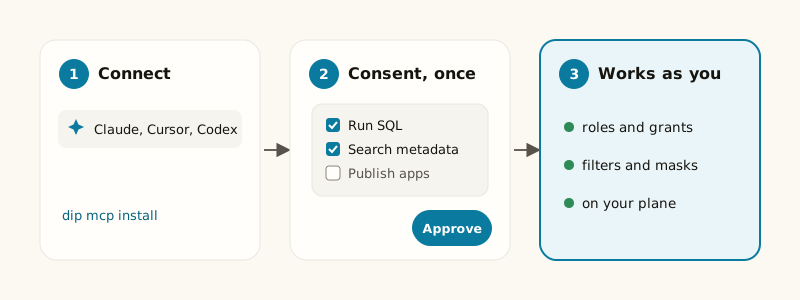
Building on Dippr
Data app and installation: A data app is a packaged application that runs inside your data plane and queries it on your users’ behalf, declared by a manifest and built with thedip CLI.
Installing one creates one running instance, with its own consent and its own wake/park state. See
Data apps overview and Install and consent.
Workspace database: A DuckDB database you own inside your data plane. You write to it
directly from your own machine, and every engine on its data plane reads it live as a read-only
catalog. See Workspace databases.